“Explain this function.”
A lightweight local model can handle a simple request.
LOCAL MODEL LiteGateIN DEVELOPMENT
LOCAL FIRST. YOUR CONTROL.
Install LiteGate on your computer and connect your AI tools. It directs their requests to your local or cloud models, following your preferences.
In development · Planned for macOS, Windows and Linux

HOW IT WORKS
The experience we are building. Public installers are not available yet.
LiteGate runs locally. It becomes the connection point between your AI tools and the models you choose.
Point compatible assistants at LiteGate. Add your cloud providers and the local model engines you already use.
Select a model yourself, or let routing consider task complexity, availability, privacy and your configured limits.
AN EVERYDAY EXAMPLE
Imagine building a website in Visual Studio Code with an AI assistant such as Continue configured to send its requests through LiteGate.

A lightweight local model can handle a simple request.
LOCAL MODELLiteGate can select a more capable cloud model, when your rules allow it.
CLOUD MODELNew requests can use a compatible local model you have running, if the route allows it.
LOCAL ALTERNATIVEOne assistant. One connection. Your models, under your rules.
Illustrative scenario; the Continue integration still needs version-specific validation. LiteGate routes only requests sent to it and does not install local models. Cloud subscriptions require a supported provider integration, still in development.
Read about connections and requirements →GATEWAY + CONTROL CENTER
Desktop, chat, routing and LAN implementations are integrated. Public release validation is still pending; expanded telemetry and subscription inventory remain planned.
Manage providers, credentials, routes and diagnostics from a native desktop app. Keep the gateway running from the menu bar or tray, even when the chat window is closed.
Manual keeps the choice with you. Smart ranks eligible models locally. Private prefers local models and permits explicitly approved remote providers. Local excludes every remote destination.
Inspect tokens, estimated cost and routing decisions. The product plan extends this view with time to first token, tokens per second, latency and a separate subscription inventory.
Check activity, token usage and the routing mode from one control panel.
Development version · Demo data · Interface shown in English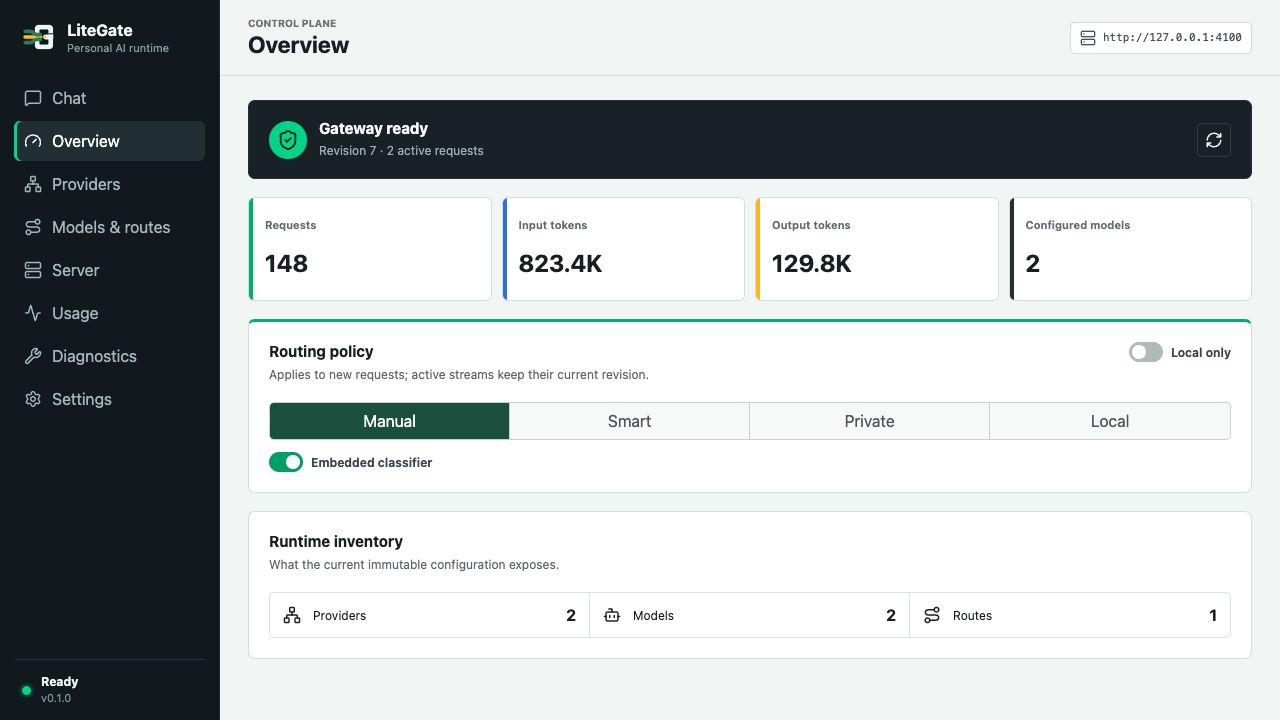 Select the image to enlarge ↗
LITEGATE IN YOUR WORKFLOW
Product scenarios · Public release pending. Client compatibility depends on protocol, version and enabled capabilities.
Connect Codex to one stable endpoint and manage destinations and policies through LiteGate.
Explore this use case →Work in your repositories with centralized provider credentials and shared policies.
Explore this use case →When a recoverable failure or provider limit occurs, try another allowed destination before delivering the response.
Explore this use case →Set budgets per tool, project or key, with visible usage, alerts and explicit policies when a limit is reached.
Explore this use case →Talk to your models inside LiteGate, with local history and visible routing decisions.
Explore this use case →Share access with trusted devices through LAN, TLS and keys with scoped permissions and limits.
Explore this use case →Give your models stable names and inspect the destinations in each route.
Development version · Demo data · Interface shown in English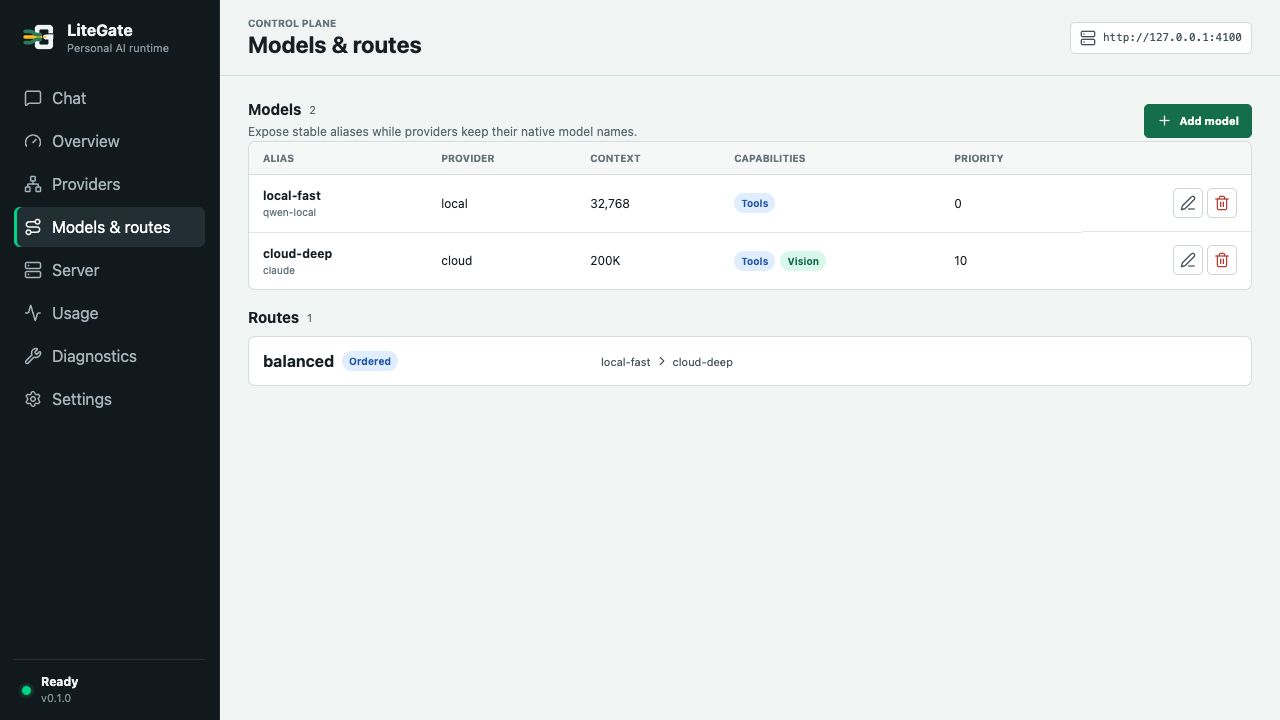 Select the image to enlarge ↗
Keep conversations and model selection together, with local history and visible routing controls.
Development version · Demo data · Interface shown in English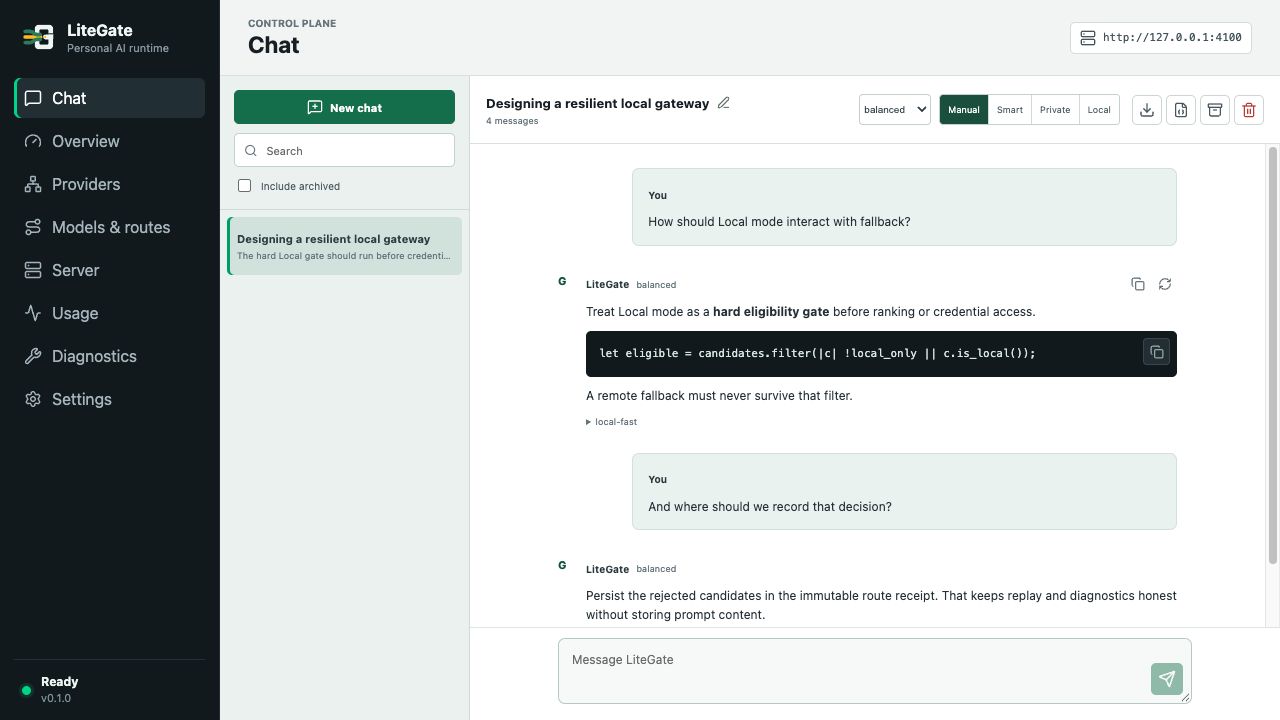 Select the image to enlarge ↗
HOW THE PIECES FIT
Your tools talk to LiteGate. Your models stay with their local engines or cloud providers. The gateway is designed to connect them under your rules.
Explore the planned architecture →Your models run in their own engines.
RELEASE READINESS
Gateway, desktop, chat, Smart routing and LAN implementations are integrated. Signing, final native platform checks and clean-machine release validation remain open. No public installer is available yet.
Check the project status →START HERE